 ros2lab
Home / Course
ROS 2 Jazzy: Zero to MoveIt 2 with Gazebo & ros2_control
From your first ros2 run to a robot arm that picks up a cube and places it on another table, with a check on every step.

01 — OUTCOMES
What you will be able to do
A learner who finishes the core lessons of Levels 1 to 4 can do these. They use the same tools ROS 2 Jazzy projects use: ros2_control, MoveIt 2 and Gazebo Harmonic.
- Explain how a running ROS 2 system is organised: which nodes exist, and what each one sends, receives and offers.
- Write Python nodes that work together through topics, services, your own message types and parameters, and start them with one launch file.
- Build a model of a mobile robot and of an arm in URDF and Xacro, and run it in Gazebo Harmonic with a sensor whose data reaches ROS 2.
- Set up ros2_control (hardware interface, controllers, controller manager) for a diff-drive robot and for an arm, so that the same controllers run on mock hardware and in Gazebo.
- Set up MoveIt 2 for an arm and write a program that moves an object from one table to another without a collision.
- Find and fix a fault that you did not put into a ROS 2 system, and show with one command that it is fixed.
- Measure what a robot really did, compare it with what it was told to do, and give a reason for the difference.
- Optional Level 5: Write a C++ hardware interface for an Arduino Uno (emulated in the lab) and run the arm with its digital twin.
02 — IS IT FOR YOU
Who it is for, and who it is not for
It fits you if
- You are an engineering student, a graduate or a working engineer who is new to ROS 2.
- You can read a little Python, or are willing to learn it as you go.
- You have a laptop or desktop with a current browser.
Look elsewhere if
- You need ROS 1 or ROS 2 Humble.
- You want SLAM and Nav2: they are not part of the lessons yet.
- You want to wire and debug a physical robot (Level 5 uses an emulated Arduino Uno).
- You expect a promise of a job. There is none.
- You have never used a terminal: take ROS 2 Fundamentals first (free if you register by 31 Dec 2026).
03 — SYLLABUS
Syllabus: all 81 lessons
Generated from the course data, so it matches what you see after you log in. Times are the lesson estimates added up.
Level 1: ROS 2 basics Free 30 lessons (22 required), about 15 h
Write nodes, topics, services, parameters and launch files in Python, then round up turtles in a capstone. Capstone: Turtle Round-Up. Project: Turtle delivery.
Get started
- 1.1What ROS 2 is20 min
- 1.2Your workspace and sourcing20 min
Discover by experiment
- 1.3Run nodes: turtlesim, teleop, rqt_graph25 min
- 1.4Topics, services and parameters from the terminal30 min
Your first node
- 1.5Create a Python package20 min
- 1.6First node: log, timer, OOP template30 min
- 1.7Node tools: ros2 node, colcon, rename at run time20 min
Topics
- 1.8What a topic is; write a publisher30 min
- 1.9Subscriber, CLI, remap30 min
- 1.10Topic activity and solution30 min
- 1.11Closed loop with turtlesim: read pose, publish cmd_vel35 min
Services
- 1.12What a service is; write a server25 min
- 1.13Client and service CLI40 min
- 1.14Service activity and solution30 min
Interfaces
- 1.15Custom message (my_robot_interfaces)30 min
- 1.15bCustom service (my_robot_interfaces)20 min
Parameters
- 1.16Parameters and YAML30 min
Launch
- 1.17Launch files (Python first, XML shown)35 min
Capstone: Turtle Round-Up
- 1.18Round-Up 1: a P-controller to a target40 min
- 1.19Round-Up 2: the spawner node40 min
- 1.20Round-Up 3: round-up service and alive-turtles topic40 min
- 1.21Round-Up 4: parameters and launch40 min
Go deeper
- G1.1Actions: a long job with updates (optional)30 min
- G1.2An action client, and how to cancel (optional)30 min
- G2.1Your first C++ node (optional)30 min
- G2.2A C++ publisher and a C++ counter (optional)30 min
- G3Bags: record a drive and play it back (optional)25 min
Professional practice: git and tests
- 1.G4Git for a ROS 2 workspace (optional)30 min
- 1.G5Testing a package: colcon test, pytest and a first launch test (optional)30 min
Level 1 project
- 1.22Project: Turtle delivery (optional)40 min
Level 2: Model & Simulate Robots Course Pass 21 lessons (19 required), about 11 h
Describe my_bot in URDF and Xacro, see its frames in RViz 2, and drive it with a lidar in Gazebo Harmonic. Project: Inspection cart.
See a robot's frames
- 2.1See a robot's TFs in RViz25 min
- 2.2The TF tree and the problem it solves25 min
Describe a robot in URDF
- 2.3First URDF: one link and a colour25 min
- 2.4Two links and a joint: the five steps35 min
- 2.5Joint types20 min
- 2.6Build my_bot: wheels, caster, base_footprint40 min
robot_state_publisher and the package
- 2.7robot_state_publisher from the terminal20 min
- 2.8The package: launch file and saved RViz view40 min
Xacro
- 2.9Xacro: properties, macros, include40 min
Gazebo and driving
- 2.10Gazebo and RViz; how Gazebo talks to ROS 220 min
- 2.11Inertial and collision tags35 min
- 2.12Spawn my_bot in Gazebo: by hand, then with a launch file30 min
- 2.13Drive my_bot: DiffDrive, the bridge and teleop35 min
- 2.14Worlds: a warehouse with boxes25 min
- 2.15Add a lidar and see /scan in RViz30 min
- 2.16Open-loop square with your own node30 min
Project: the ROS2Lab arm
- 2.17ROS2Lab arm: links and joints with meshes40 min
- 2.18ROS2Lab arm: adapt it for Gazebo30 min
- 2.19ROS2Lab arm: move the joints from ROS 235 min
Professional practice: QoS
- 2.G1QoS: why a subscriber hears nothing (optional)30 min
Level 2 project
- 2.20Project: Inspection cart (optional)40 min
Level 3: Control Robots with ros2_control Course Pass 10 lessons (9 required), about 5.5 h
Bring up diff_drive_controller and joint_trajectory_controller, first on mock hardware, then in Gazebo. Project: Take over a bringup.
ros2_control with mock hardware
- 3.1Why ros2_control20 min
- 3.2The ros2_control tag in my_bot (mock)25 min
- 3.3Controller YAML: joint_state_broadcaster and diff_drive_controller35 min
- 3.4Start it from the terminal, then from a launch file35 min
- 3.5The ros2 control CLI and a debugging recipe20 min
ros2_control in Gazebo
- 3.6The same stack in Gazebo35 min
Project: the ROS2Lab arm with ros2_control
- 3.7ROS2Lab arm: the ros2_control tag35 min
- 3.8ROS2Lab arm: joint_trajectory_controller on mock35 min
- 3.9ROS2Lab arm: Gazebo, send a trajectory35 min
Level 3 project
- 3.10Project: Take over a bringup (optional)40 min
Level 4: Plan Motion with MoveIt 2 Course Pass 14 lessons (11 required), about 7.5 h
Configure MoveIt 2 for the ROS2Lab arm, plan from RViz and from Python, and build a pick-and-place. Capstone: pick and place in Gazebo. Project: Past the post.
MoveIt 2: plan and execute
- 4.1What MoveIt does; forward and inverse kinematics20 min
- 4.2Prepare the URDF for MoveIt: collision shapes25 min
- 4.3The MoveIt Setup Assistant40 min
- 4.4The generated package and the demo35 min
MoveIt 2: gripper, bringup and Python
- 4.5The gripper: poses and end effector25 min
- 4.6arduinobot_bringup: one command for everything30 min
- 4.7moveit_py: joint goals and point goals35 min
- 4.8A commander node: topic to motion30 min
Capstone: pick and place in Gazebo
- 4.9Capstone 1: the world, two copies35 min
- 4.10Capstone 2: grasp and lift35 min
- 4.11Capstone 3: pick and place40 min
Go deeper: the arm on my_bot
- 4.G1The ROS2Lab arm on my_bot at real scale (optional)30 min
Go deeper: an action server for the arm
- 4.G2An action server for the arm: ask for a pose, get an answer (optional)30 min
Level 4 project
- 4.12Project: Past the post (optional)40 min
Level 5: Connect Real Hardware Course Pass, optional, Arduino emulated 6 lessons, about 3.5 h
Write a C++ hardware interface for an Arduino Uno (emulated in the lab) and run the arm with its digital twin. Capstone: digital twin. Project: Commission a replaced servo.
The Uno and its servos
- 5.1The Uno and its serial line30 min
- 5.2Servos: angles, centres, directions, limits30 min
Hardware interface and digital twin
- 5.3Your hardware interface in C++40 min
- 5.4One bringup: mock, Gazebo, real30 min
- 5.5Capstone: digital twin40 min
Level 5 project
- 5.6Project: Commission a replaced servo40 min
04 — PROJECTS
Projects, and what is checked automatically

Level 2
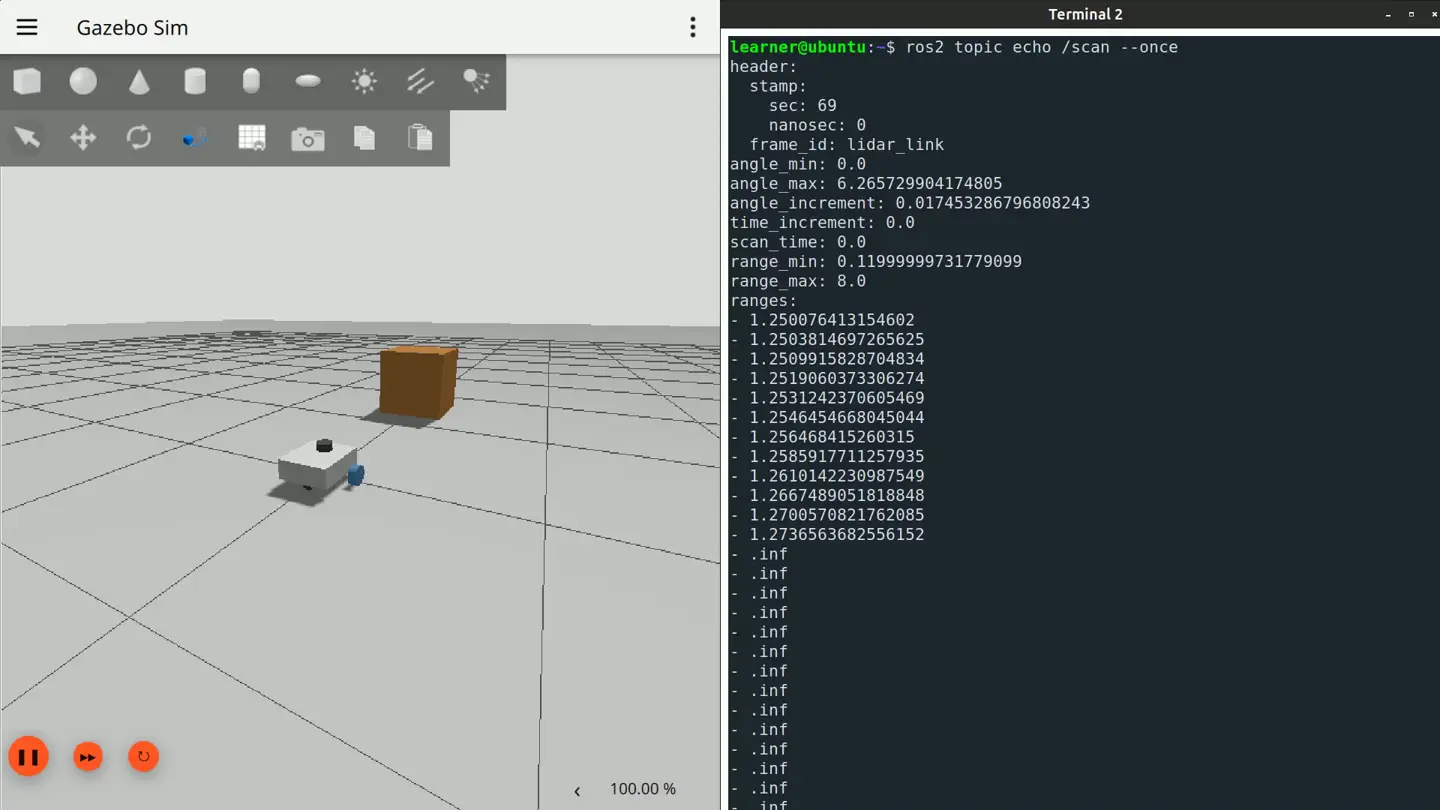
my_bot with a lidar in Gazebo
/scanis published at a steady rate- One
/scanmessage reaches ROS 2

Level 3
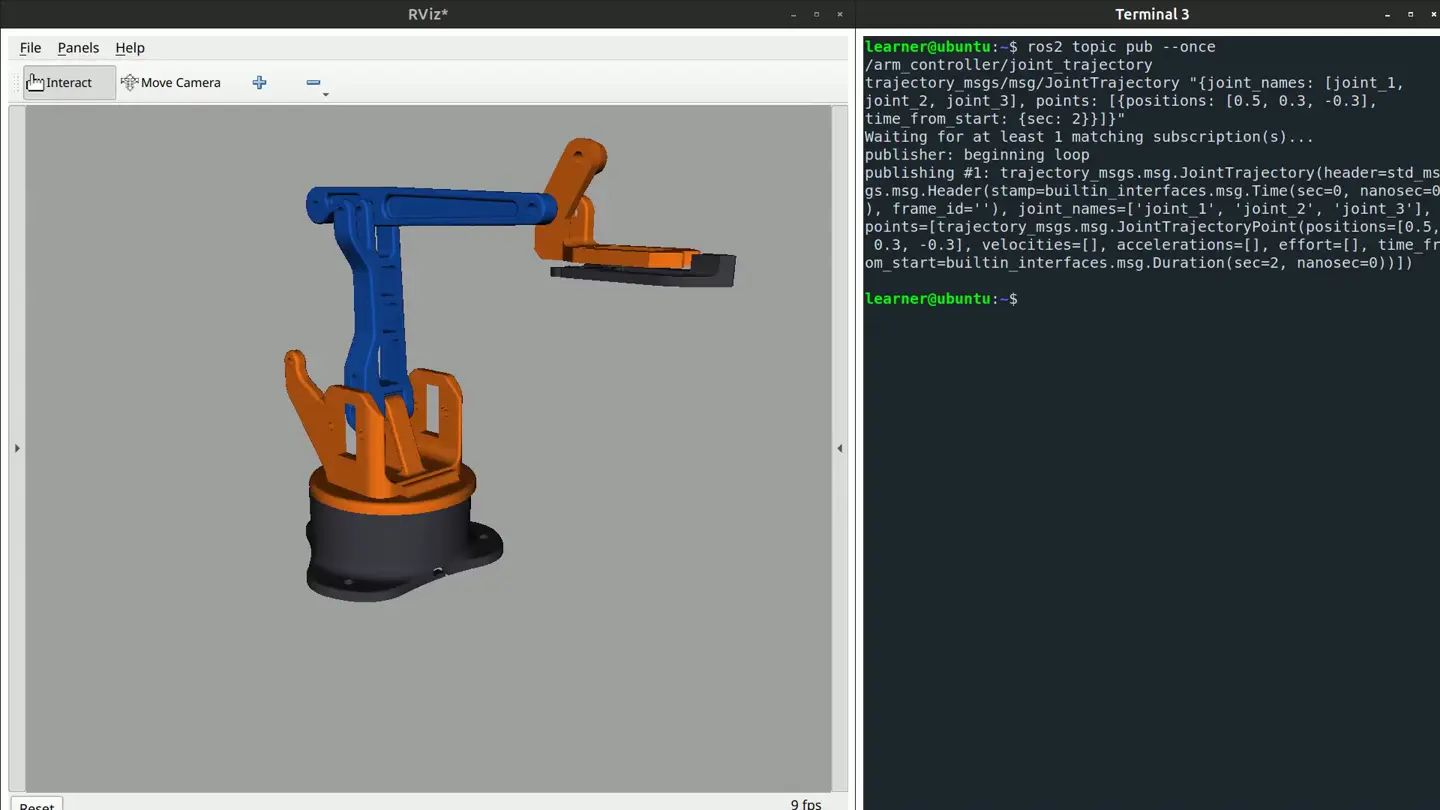
The arm under ros2_control
ros2 control list_controllersshows your controllers/joint_statesshows the positions you sent
Level 4 capstone
Pick and place with MoveIt 2
- Your program runs every step of the job
- The cube stands on the second table, within 6 cm of its place
05 — WHAT YOU NEED
What you need
You can do the whole course in the Browser Lab. If you have Ubuntu 24.04, "My ROS 2 PC" mode runs the same lessons in your own ROS 2 Jazzy.
| Item | Browser Lab | My ROS 2 PC |
|---|---|---|
| Computer | A laptop or desktop with a keyboard and a current web browser | Ubuntu 24.04; or Windows 11 (or Windows 10 build 19044+) with WSL2; or macOS 12+ with a virtual machine |
| Processor and memory | Nothing special | Works, may be slow: 2 cores, 4 GB on an Ubuntu PC (8 GB on Windows or Mac). Recommended: 4 cores or more and 16 GB (our estimate) |
| Free disk space | None | Ubuntu PC: 15 GB. Windows: 20 GB. Mac: 46 GB (our estimates) |
| Graphics | WebGL in the browser, for Gazebo and RViz 2 models | Any; a graphics card with OpenGL 3.3 or higher is recommended (Gazebo's documentation) |
| Install | Nothing | Module 0 of the course: set up your PC, 15 to 40 minutes on most connections |
| What runs | The real launch files and JavaScript models of the ROS 2 programs, not the compiled programs | Your real ROS 2 Jazzy, Gazebo Harmonic and MoveIt 2 |
| Phone | You can read lessons, answer questions and keep your progress. The lab needs a laptop or desktop. | |
One command tells you whether your PC is ready
$ ros2lab doctor
ros2lab doctor 0.6.27 on ubuntu-24.04 (ROS 2 jazzy)
  ✓ ROS 2 Jazzy installed
  ✓ ros2 CLI answers
  ✓ course packages installed
  ✓ Gazebo Harmonic (gz sim 8)
  ✓ course workspace built
  ✓ my_bot launch file found
  ✓ ros2lab environment sourced
  ✓ ROS_DOMAIN_ID 42 (this PC)
  ✓ VS Code and course extensions (ms-python.python@2026.10.0, Ranch-Hand-Robotics.rde-ros-2@1.2.1, Ranch-Hand-Robotics.urdf-editor@1.7.1, redhat.vscode-yaml@2.0.0, redhat.vscode-xml@0.29.3)
Real output, captured on the course PC (Ubuntu 24.04, ROS 2 Jazzy) on 19 November 2026.
06 — CHECKS
How the checks work
A check does not ask whether you typed the expected text. It looks at the state of the system after your command: is the node running, is the topic carrying data, where is the cube. In the first exercise the check is "turtle1 has moved": it passes when the turtle's pose is more than one metre from where it spawned, however you moved it.
In My ROS 2 PC mode the same checks run against your own machine. If a check stays grey, the lesson's error cards show common mistakes at that step.
07 — TEACHER
Who teaches this
A robotics teacher in India who runs the Robotics & ROS 2 Lab channel on YouTube, where ROS 2 is explained step by step with hands-on demonstrations. The course follows the same style: one idea at a time, tried out straight away.
"The hardest part of ROS 2 for my students was never the ideas. It was the first afternoon: the install, the versions, and nobody to say whether the thing on the screen was right. So the course checks your work for you at every step."
Level 1 is free and complete, so you can try the teaching style before you pay. Write to info@ros2lab.com with any question about a lesson.
Watch a video from the channel (YouTube, opens in a new tab)
08 — PRICING
Free and Course Pass, side by side
| Item | Free | Full Course Pass |
|---|---|---|
| Price | Nothing | ₹1,499, one payment, all taxes included. No subscription. On sale from 1 December 2026. |
| Founding price | ₹999 for everyone who started Level 1 with a free account or joined the waitlist, 1 December 2026 to 7 December 2026, bought with the email they joined with. These dates are fixed. | |
| Lessons | Level 1: 30 lessons | Levels 2 to 5: 51 more lessons |
| Browser Lab and checks | Yes | Yes |
| My ROS 2 PC mode | Yes | Yes |
| Certificates | Level 1 | Levels 2 to 5 |
| Videos | 26 lesson videos made so far, free for everyone. The narrator is an AI-generated voice. | |
| Access | Open | The whole ROS 2 Jazzy edition of the course, at least until Jazzy's end of life (May 2029), with free updates |
| Certification exam | Coming soon, no date yet. Included for founding buyers when it launches. | |
In India you pay in INR by UPI, card or netbanking; elsewhere by card in USD, EUR or GBP, through Razorpay. The seller's GST number appears on the receipt once the seller's GST registration is complete; until then the receipt shows no tax breakdown.
Changed your mind? Full refund within 7 days of paying, if you have opened at most 3 paid lessons. No reason needed. Charged twice, or paid and got no access? Always a full refund.
For colleges and clubs
A batch pack is ₹500 per student for 12 months, for at least 10 students, plus 1 free seat for the coordinator. 10 students: ₹5,000 in all.
09 — CERTIFICATE
Certificate
One certificate per level. When the automatic check of every required lesson of a level has passed, you request it, the teacher reviews the request, and the certificate is issued. It is valid for 2 years. Each has a public verification page with a QR code and an "Add to LinkedIn profile" button. Certificates confirm course completion; they are not a job guarantee. The timed certification exam is coming soon.
10 — QUESTIONS
Questions
Do I need Ubuntu? Can I use Windows or WSL?
Level 1 needs only a browser. Levels 2 to 5 are built, recorded and checked on Ubuntu 24.04 with ROS 2 Jazzy on your own PC. Module 0 of the course shows how to set it up (Ubuntu 24.04, or Windows 11 with WSL2), and ros2lab connect links each lesson to it.
Can I learn on my phone?
You can sign up, read lessons and keep your progress on a phone. The lab needs a laptop or desktop. No robot and no Arduino are needed.
Is the voice AI?
Yes. The narration in the lesson videos is AI-generated, made from a recorded voice with that speaker’s consent. Each video says so.
Is there a real robot?
No physical robot is needed. Level 1 runs in the Browser Lab; in Levels 2 to 5, Gazebo Harmonic, RViz 2 and MoveIt 2 run in simulation on your own PC. The Arduino Uno of the optional Level 5 is emulated in the lab. The Browser Lab runs the real launch files and JavaScript models of the ROS 2 programs, not the compiled programs.
When is the exam?
The timed certification exam is coming soon; it has no date yet. Today there is one certificate per level: the Level 1 certificate is free, and the Level 2–5 certificates come with the Full Course Pass. Founding Batch buyers get the exam included when it launches.
How do refunds work?
Changed your mind? Full refund within 7 days of paying, if you have opened at most 3 paid lessons. No reason needed. Charged twice, or paid and got no access? Always a full refund. Read the refund and cancellation policy.
Who teaches this?
A robotics teacher in India, who also runs the Robotics & ROS 2 Lab channel on YouTube, writes the lessons and the lab and keeps improving them. Questions before you buy: contact us.
Why Jazzy and not Humble?
ROS 2 Jazzy Jalisco is a long-term support release. It came out in May 2024 for Ubuntu 24.04 and is supported until May 2029. Humble (2022, Ubuntu 22.04) ends in May 2027. Jazzy goes with Gazebo Harmonic, and some settings differ from Humble: for example, on Jazzy the diff_drive_controller takes a stamped velocity message. The ideas carry over to Humble, but a Humble configuration file pasted into Jazzy does not always run.
Can I get an invoice for my employer?
After you pay, you see a receipt page with the seller, order number, date, amount, currency and a tax line. The seller’s GST number appears on it once the seller’s GST registration is complete. Until then the receipt says so and shows no tax breakdown. For anything else, contact us.
I am already logged in. Where is my course map?
Your progress, level locks and certificates are on the course map.
Start with a turtle. Finish with a robot arm.
Lab needs a laptop or desktop. On a phone you can read lessons and keep your progress.
Last updated: 19 November 2026. Changelog