Home › Courses › ROS 2: Zero to MoveIt 2
ROS 2 Jazzy: Zero to MoveIt 2 with Gazebo & ros2_control
Build, simulate and control a mobile robot and a robot arm in Python, with C++ in Level 5 - free Browser Lab, nothing to install.
5 levels · 81 lessons (about 42 hours with the optional ones) · automatic checks in every lesson · a certificate for each level · Level 1 free, Levels 2-5 Rs 1,499 once
Start Module 0 Go straight to lesson 1.1
No set-up needed for the Browser Lab: Module 0 takes a minute (choose where you work), then lesson 1.1. Level 1 is free.

About this course
You build two robots in software and make them move: my_bot, a two-wheeled mobile robot with a lidar, and the ROS2Lab arm, a robot arm with a gripper. You start with ROS 2 itself and a turtle on the screen. You end with an arm that picks up a cube and puts it on another table. You do every lesson yourself in a lab beside the text; the page checks your work.
Who it is for: students from class 12 and first-year engineering upwards, and anyone who wants to start with ROS 2. Level 1 starts from zero: it shows the terminal, the editor and Python as they are needed. School maths (angles, and x, y and z) helps from Level 2.
- Level
- Beginner: starts from zero
- Length
- About 42 hours of lessons; the Challenges are extra
- Lessons
- 81 (61 core, the others optional)
- Labs
- 79 lessons with a hands-on lab
- You need to know
- How to use a computer and a web browser
- Tools
- ROS 2 Jazzy, Gazebo Harmonic, ros2_control, MoveIt 2
- Award
- A certificate for each level
- Access
- Level 1 free; Levels 2-5 Rs 1,499 once
What you will be able to do
A learner who finishes the core lessons of Levels 1 to 4 can:
- Explain how a running ROS 2 system is organised: which nodes exist, and what each one sends, receives and offers.
- Write Python nodes that work together through topics, services, your own message types and parameters, and start them with one launch file.
- Build a model of a mobile robot and of an arm in URDF and Xacro, and run it in Gazebo Harmonic with a sensor whose data reaches ROS 2.
- Set up ros2_control (hardware interface, controllers, controller manager) for a diff-drive robot and for an arm, so that the same controllers run on mock hardware and in Gazebo.
- Set up MoveIt 2 for an arm and write a program that moves an object from one table to another without a collision.
- Find and fix a fault that you did not put into a ROS 2 system, and show with one command that it is fixed.
- Measure what a robot really did, compare it with what it was told to do, and give a reason for the difference.
Each level card below lists what you can do after that level. The syllabus has all of it on one page, with the time each level takes and how your work is checked.
Course plan
Module 0 is optional if you use the Browser Lab. Level 1 is free. Open a level to see its lessons; a filled circle is a lesson you have done.
The Browser Lab
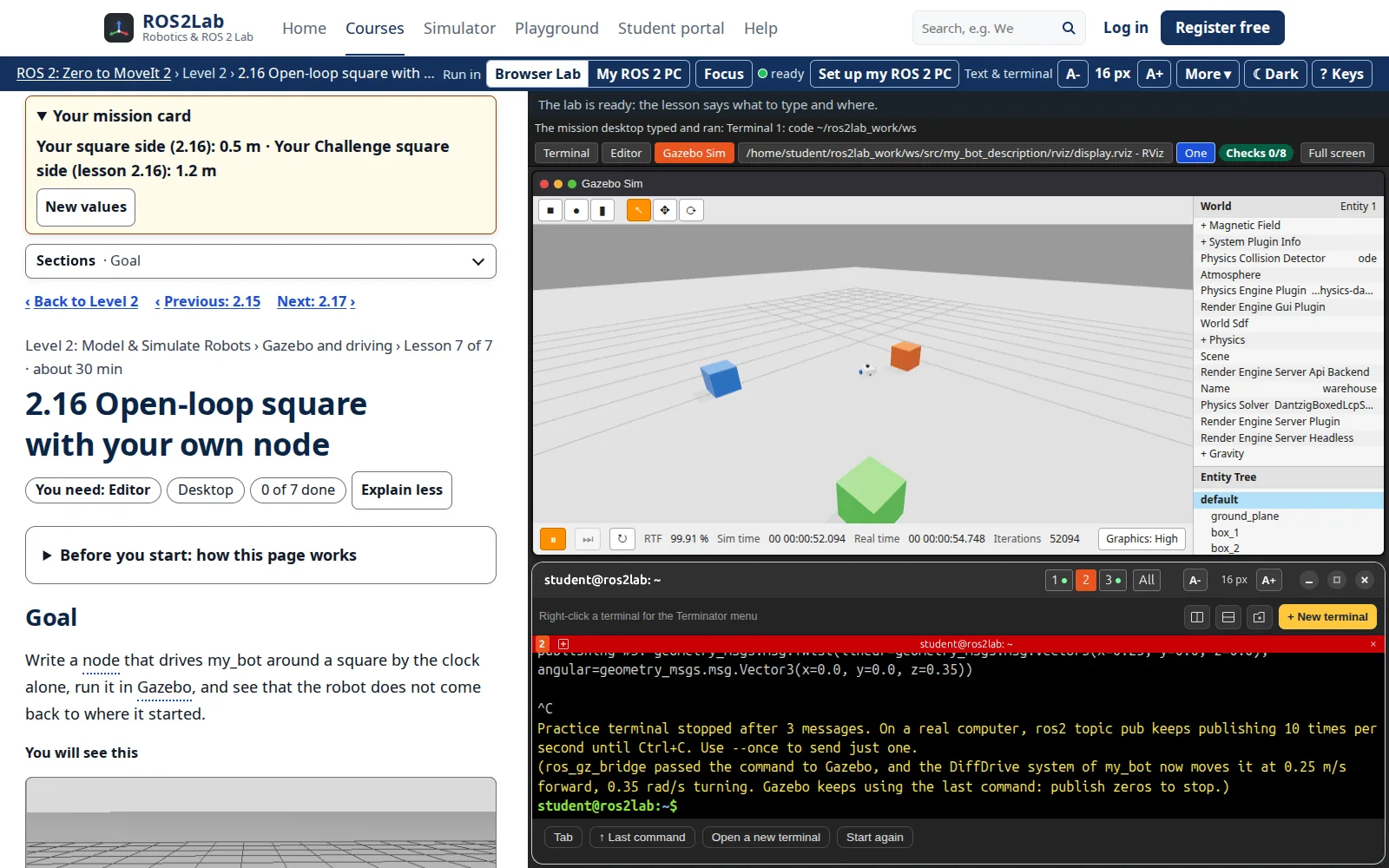
Each lesson opens a practice Ubuntu computer beside the text: terminals, a VS Code-style editor, RViz 2 and Gazebo. You type the real ROS 2 commands, and the page checks your work as you go.
- Nothing to install: it starts in a few seconds.
- The same commands, topics and error messages as ROS 2 Jazzy.
- Switch to My ROS 2 PC to run the same lesson on your own Ubuntu.
The Browser Lab runs the real launch files and JavaScript models of the ROS 2 programs. It does not run the compiled programs.
Ratings and reviews
Pricing
Level 1
Free
ROS 2 Foundations: every lesson, the Browser Lab, the checks and the Level 1 certificate.
Full Course Pass
Rs 1,499 one-time, all taxes included
Levels 2-5: the lessons, the lab, the checks, the solutions and the level certificates.
Sales planned: 1 Dec 2026
Join the waitlist Prices and founding offer
Lesson videos are being made; they will be free on YouTube. A college code from your teacher unlocks the same levels.
Who made this course
ROS2Lab · Robotics & ROS 2 Lab on YouTube
Made by the ROS2Lab team: robotics educators building hands-on ROS 2 courses.
Online robotics courses for beginners, with a terminal, simulator and RViz in the browser. On the YouTube channel ROS 2 is explained step by step with hands-on demonstrations; this course follows the same style: one idea at a time, tried out straight away.
Questions
Do I need Ubuntu?
No. Every lesson runs in the Browser Lab, a practice Ubuntu 24.04 computer in your browser. If you want the real ROS 2 on your own computer as well, Module 0 shows how (Ubuntu 24.04, or Windows 11 with WSL2).
Why Jazzy and not Humble?
ROS 2 Jazzy Jalisco is a long-term support release: it came out in May 2024 for Ubuntu 24.04 and is supported until May 2029. Humble (2022, Ubuntu 22.04) ends in May 2027. Jazzy pairs with Gazebo Harmonic, and some settings differ from Humble: for example, on Jazzy the diff_drive_controller takes a stamped velocity message. The ideas you learn here carry over to Humble; a Humble configuration file pasted into Jazzy does not always run.
What do I need to know before I start?
How to use a computer and a web browser. Level 1 starts from zero: it shows the terminal, the editor and Python as they are needed. Some school maths (angles, x and y) helps from Level 2.
What is the Browser Lab?
A practice computer in your browser: terminals, an editor, RViz and Gazebo windows. It runs the real launch files and JavaScript models of the ROS 2 programs, so you can practise without installing anything. My ROS 2 PC mode runs the same lessons on your own ROS 2 instead.
Can I learn on my phone?
You can read the lessons and answer the questions on a phone. The lab needs a laptop or desktop: each lesson page has a link to send it to yourself.
Is it free? What about refunds?
Level 1 is free. Levels 2-5 come with the Full Course Pass: Rs 1,499 once, all taxes included. Sales are planned to open on 1 December 2026: join the waitlist. You can ask for a full refund within 7 days of buying if you have opened at most 3 paid lessons (Level 2 onward). Lesson videos are being made; they will be free on YouTube.
Start with a turtle. Finish with a robot arm.
Level 1 is free and needs no account.
Credits: the ROS2Lab arm model is based on Arduinobot by Antonio Brandi (Apache-2.0). Sources and credits