 ros2lab
Home / ROS 2 Fundamentals
ROS 2 Fundamentals
A six-week course for complete beginners. It starts at your first terminal command, teaches Python from zero, and ends with ROS 2 nodes you wrote yourself.
Register free See every lesson in the course plan
Where this course stands today
You register with your email, verify it, and Day 1 opens straight away. Your access lasts 60 days from the day you register. Finish every lesson and pass every weekly test in those 60 days and your access stays open for life.
What happens to registration after 31 December 2026 has not been announced yet. It will be on this page and the changelog first.
What a Day 1 lesson looks like
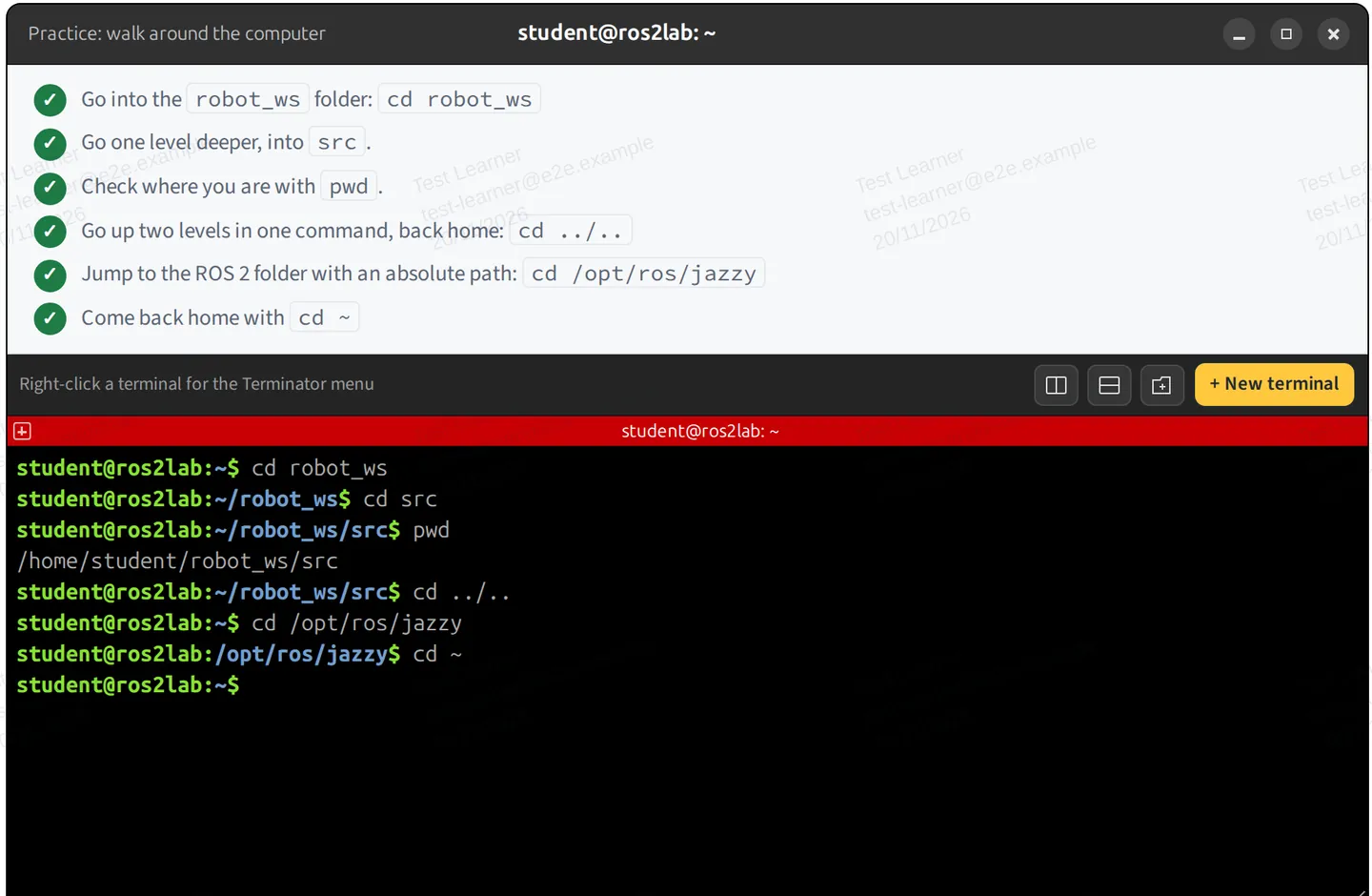
You read a short explanation, then practise in a terminal on the same page. In the lesson on the left you walk around the computer with cd and pwd, and each of the six steps is ticked only when the terminal really is in that folder. The practice terminal is a model that answers like Ubuntu 24.04; it is not a real Ubuntu computer.
This is the beginner course. It is separate from ROS 2 Jazzy: Zero to MoveIt 2, which is the main course now and goes on to Gazebo, ros2_control and MoveIt 2. If you are comfortable with a computer and can read a little Python, start there instead: its Level 1 is free too.
01 — IS IT FOR YOU
Who it is for
Take this course if
- You have never written code, or never used a Linux terminal.
- You are a school or college student, a graduate, a lecturer or an engineer who is new to ROS.
- You can give it about 1 to 2 hours a day.
Skip it if
- You already write Python and use a terminal. Go to Zero to MoveIt 2.
- You want Gazebo projects, ros2_control or MoveIt 2. They are in the other course.
Under 18? Register with a parent's or guardian's consent (Terms of Use, Privacy notice).
02 — WEEK BY WEEK
Week by week
Five days of lessons each week, then a timed test. Days 1 to 9 need only a browser. On Day 10 you install ROS 2 Jazzy on Ubuntu 24.04; after that every lesson still works in the practice terminal.
| Week | Topic | You will learn | Ends with |
|---|---|---|---|
| 1 | Talk to the robot's computer | The Ubuntu terminal, files, Python from zero | Test |
| 2 | Build the robot's brain | Python objects, C++ basics, installing ROS 2 Jazzy | Test |
| 3 | Introduction to ROS | Why robots need ROS, ROS 1 vs ROS 2, DDS and QoS | Test |
| 4 | Speak ROS 2 | Nodes, topics, services, parameters, actions, launch | Test |
| 5 | ROS programming fundamentals | Your own packages, publishers, subscribers, services | Test |
| 6 | Writing your own ROS 2 nodes | Nodes that control a robot, in Python and C++ | Test and project |
03 — TESTS AND PROJECT
Tests, project and certificate
- Weekly tests: 15 questions in 35 minutes in Weeks 1 to 4, 16 questions in 40 minutes in Weeks 5 and 6. Two attempts, your best score counts, 60% passes.
- One personal project after the last lesson, with names and numbers chosen for you alone. It is marked out of 100 and 80 passes.
- The certificate shows your test marks and project score. It is valid for 2 years and has a public verification page.
04 — QUESTIONS
Questions
I have never written code. Can I join?
Yes. Week 1 starts with your first terminal command, and Python is taught from zero.
Do I need Ubuntu or a powerful laptop?
Not to start. Days 1–9 need only a browser. On Day 10 you install ROS 2 Jazzy on Ubuntu 24.04 (WSL2, dual boot, a virtual machine or a lab computer). After that every lesson up to Day 30 still works in the practice terminal in your browser. Ubuntu helps most for the final project, but it is not required.
Can I learn on my phone?
Yes. Lessons, animations, games and tests work on a phone. A laptop is more comfortable for typing code in the practice terminal.
How do the weekly tests work?
Each week ends with a timed test that opens when you finish that week’s lessons: 15 questions in 35 minutes in Weeks 1–4, 16 questions in 40 minutes in Weeks 5–6. Every student gets a different paper. You get two attempts, your best score counts, and 60% passes.
- Answers: once you pass, or after your last attempt, you can see every question with your answer, the correct answer and why.
- Two attempts below 60%: write to info@ros2lab.com (or ask your college coordinator); the teacher can give you another attempt.
- Deadline: tests have no fixed date, but to keep the course for life, pass every Week 1–6 test within your 60 days.
How is the personal project marked?
After the last lesson you get your own small ROS 2 project, with names and numbers chosen just for you. You submit your package files and a short report, up to two times. It is marked out of 100 and 80 passes:
| Works as specified in your brief | 40 |
| Uses exactly the names, message types and values in your brief | 15 |
| Clean ROS 2 code: node class, timers and callbacks, logging | 20 |
| Launch file and YAML parameters start the whole project | 10 |
| Report: explains the design and the exact commands to run it | 15 |
What does the certificate show?
Your name, the six modules, every test mark, your project score, the issue date and 2-year validity. Its ID and QR code open the Verify page, which confirms it is genuine. You can add it to LinkedIn.
Is the course free?
ROS 2 Fundamentals (six weeks): yes, for everyone who registers in its first batch, until 31 December 2026. ROS 2 Jazzy: Zero to MoveIt 2 is a separate course: Level 1 is free, Levels 2–5 come with the Full Course Pass (pricing).
How long can I use the course?
60 days from the day you register. Finish every lesson of Weeks 1–6 and score at least 60% in each test within those 60 days, and your access stays open for life. In your first registration you can ask once for up to 30 extra days.
How much time does it take?
About 1–2 hours a day (Weeks 5 and 6 are the longest), around 48 hours in total.
Before you enrol: what do parents and teachers need to know?
- Language: the lessons, tests and practice terminal are in English.
- Starting level: no coding needed; Python and the terminal are taught from zero. Days 1–9 need only a browser.
- Time: about 1–2 hours a day for 30 days of lessons, plus the tests and the project.
- Under 18: register with a parent’s or guardian’s consent (Terms of Use, Privacy notice). You can delete the account and its data at any time.
- Syllabus: the course plan lists every lesson, test and the project marking scheme, and prints as a PDF.
Who can join?
Students (undergraduate, master’s or PhD), graduates, lecturers, researchers and engineers. If you are under 18, register with a parent’s or guardian’s consent.